Scaling SDR outbound to 1,000 emails/day (responsibly)
This is about a system I built that lets one SDR send 1,000 tailored emails a day, starting from nothing but Salesforce and Outreach. To do that, the first thing we had to do was get all of the company’s data into one place. Everything after that was deciding what to do with it, and it broke into steps: how to score the contacts, how to get them out of Salesforce, how to model and score and exclude them, how to distribute them, and how to make all of it work on an interface a rep would actually use.
Every two weeks each rep gets a patch1 of 2,000 people worth writing to, ranked, with the reason each one is there and the emails drafted from facts the system can show. The rep sends them. The same tools that build the pages are exposed as an MCP server, so a rep can ask Claude “who in my patch has product usage and no phone” and get the same answer the page would give.
The constraint is what has to be true before a draft is worth sending. Getting all of that into one database is most of the work, and it’s what the rest of this essay is about.
I stripped the problem to its constraints and built up from there. How many emails can leave one mailbox before Google notices? How many people can a rep put an email in front of in a day? How many drafts can one person read before lunch? None of those are opinions. Once you have them, most of the system is forced, and the questions people start with, which tool, which model, which template, are the least important ones.
The numbers
1,000 sends a day can’t leave one mailbox. Everyone who runs cold email for a living lands in the same range, somewhere between 30 and 50 a day per warmed mailbox, so 1,000 a day is 25 mailboxes at about 40 each, spread over ten or so secondary domains.2
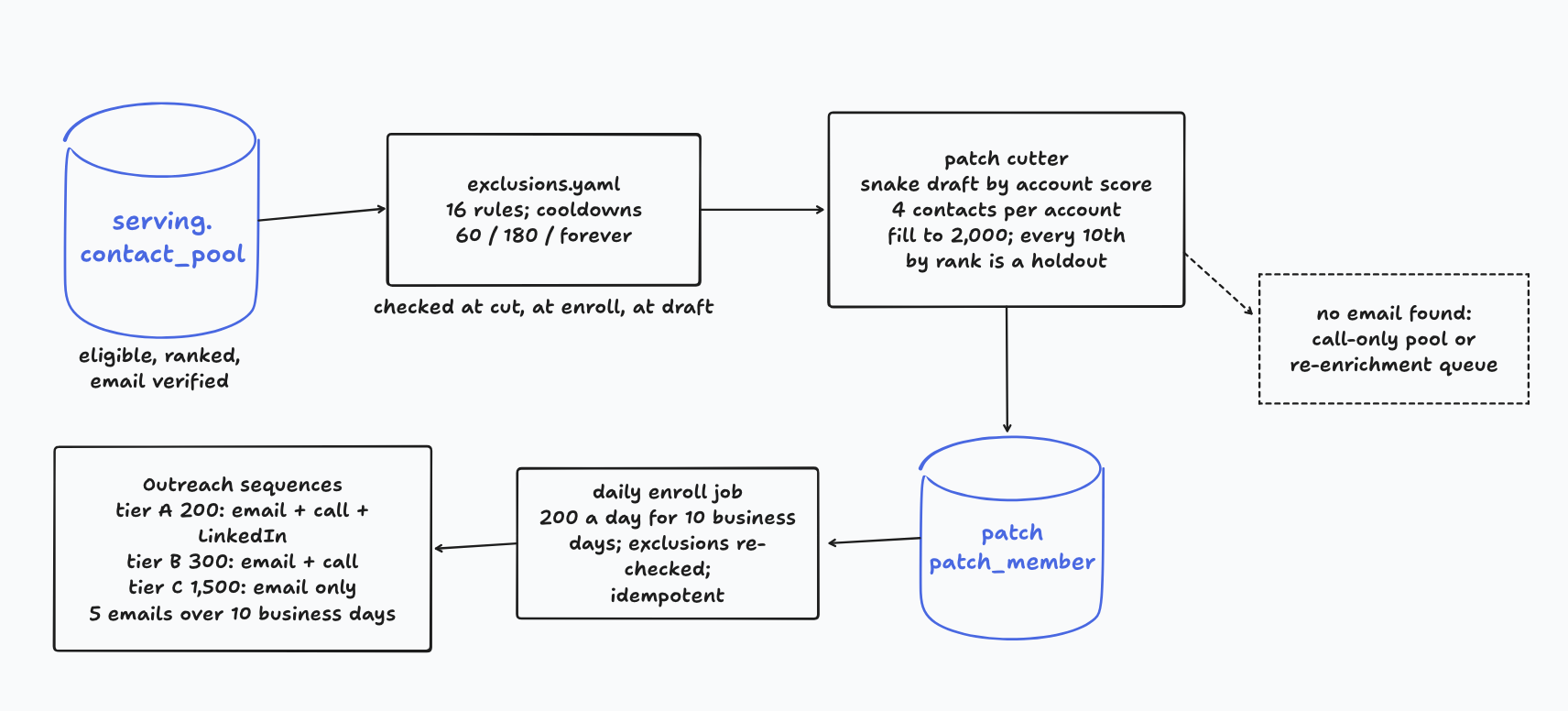
A sequence, as we define it here, is five emails over ten business days.3 So 1,000 sends a day means 200 new people entering a sequence every day, and ten business days of that is 2,000. Each rep gets a patch of 2,000 contacts every two weeks, enrolled in daily slices of 200.
Inside the 2,000, three tiers: 200 in tier A get emails, calls and LinkedIn; 300 in tier B get emails and calls; the other 1,500 in tier C get emails only. Most people are in tier C on purpose. Most of the people you write to aren’t ready to buy anything this quarter, and the right amount of effort for them is one good email.
For comparison, the median SDR today sends about 40 emails a day.4 This is 25 times that, which is why a rep in this system doesn’t write emails. They send them.
Step 1: decide how to score the contacts
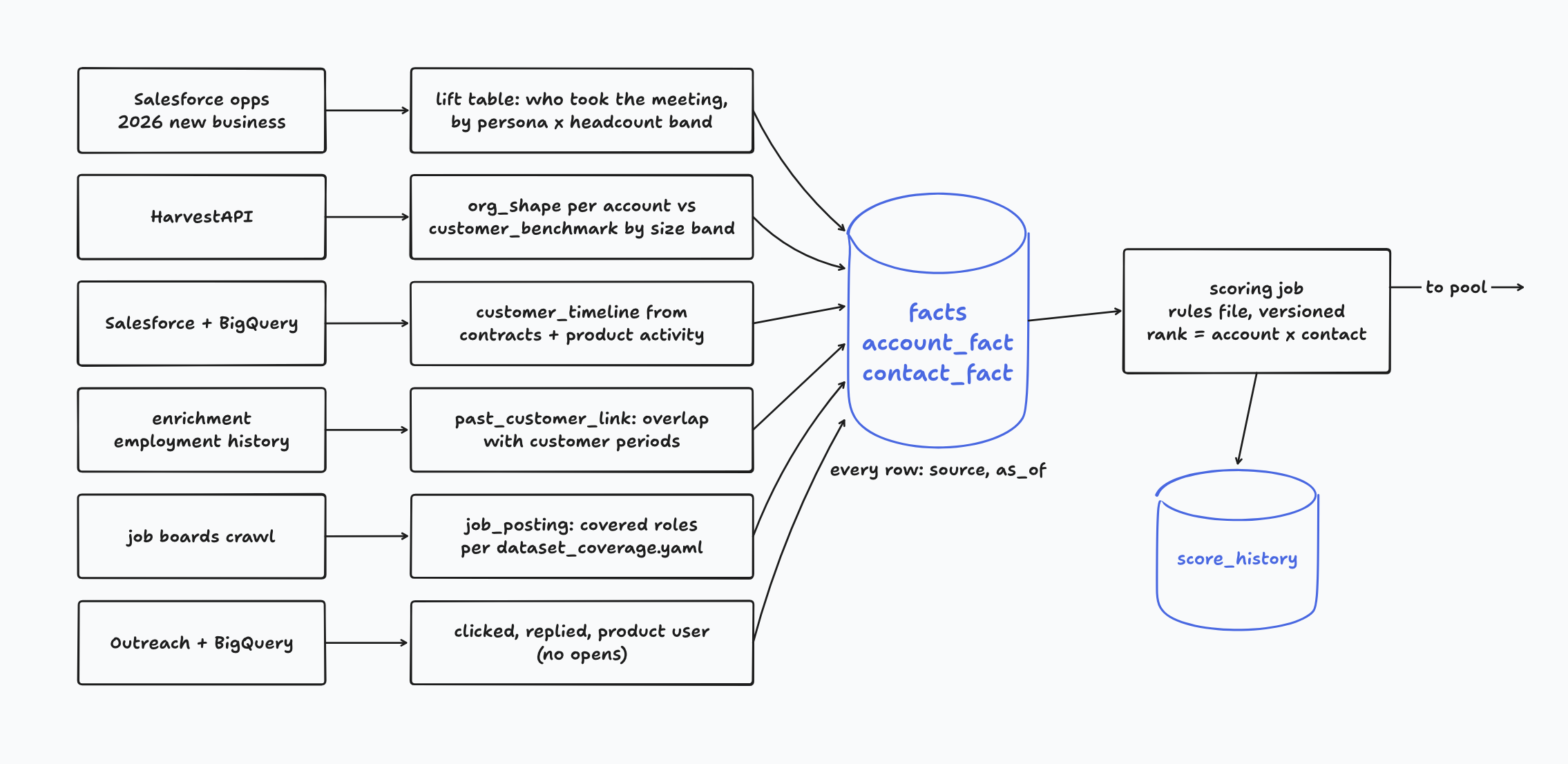
Before we ranked 2,000 people, we had to know what a good one looked like, and the way we found out was to look at who had met with us. This is what worked for us, not a law of nature. We took every new-business opportunity created this year. For each one, we found the contact who was on the first held meeting. We bucketed their companies by headcount: 1 to 50, 51 to 200, 201 to 1,000, 1,001 to 5,000, 5,000 and up. We classified each contact’s title into a persona and a seniority. That gave us a table of who takes the meeting, by company size, and it was different at every size.
That table became the scoring rule. Everything else in the score, title, engagement, org shape, past-customer status, is a way of estimating where a new contact would sit in it. The order mattered for us: we decided what we were optimizing for first, from our own closed-won data, and only then went to get the contacts.
Step 2: get the contacts out of Salesforce
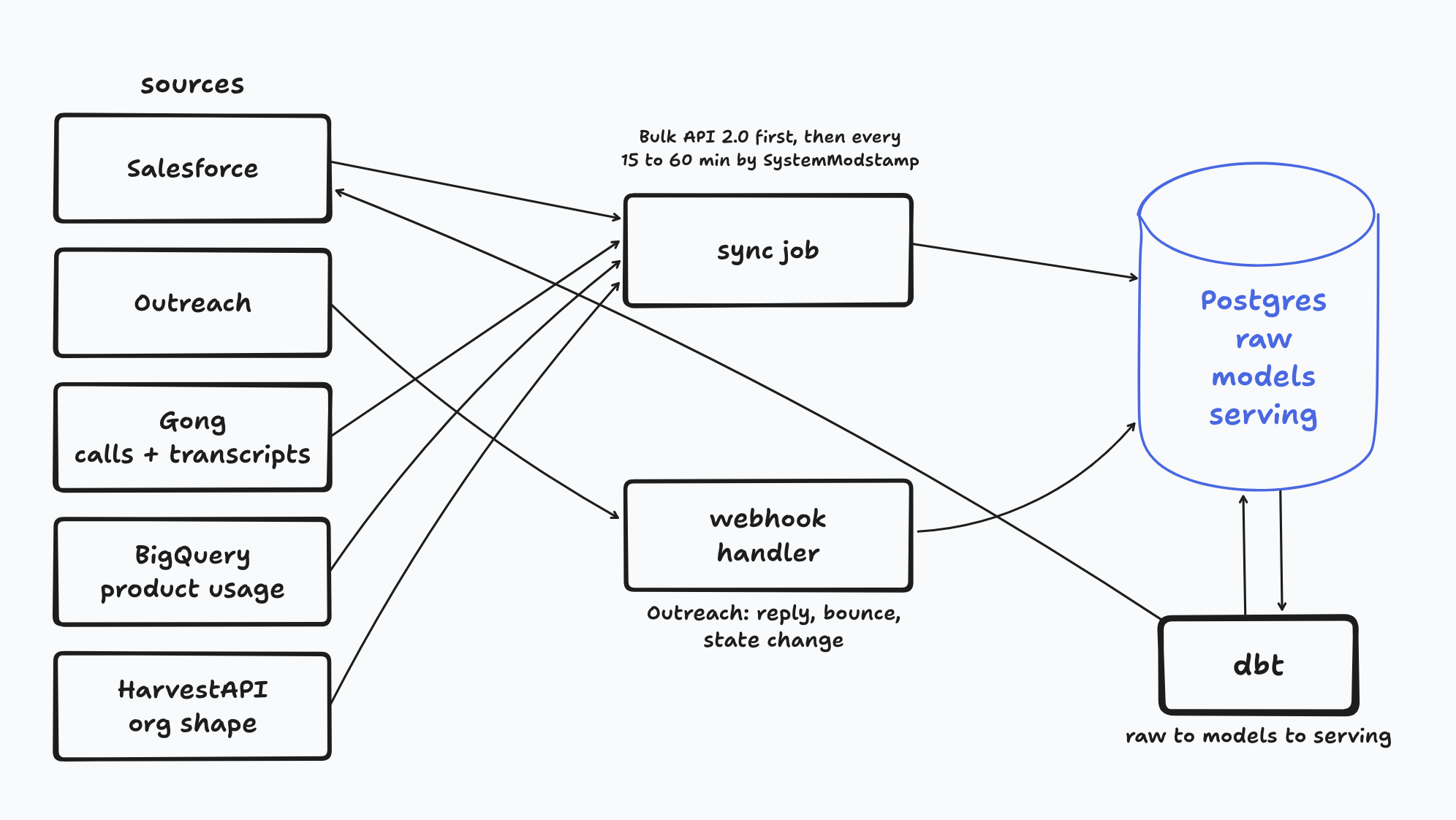
A sync is a scheduled program that copies a defined set of fields from each source into raw tables in one Postgres. One database, a schema per source, and every row landing exactly as the source said it, with a synced_at timestamp.
Then a config file per source, sync/salesforce.yaml and so on, listing the objects and the fields. Only sync the fields the models need. The temptation is to pull everything, and the cost isn’t storage, it’s that every renamed field in Salesforce becomes your problem. For Salesforce that’s Account, Contact, Contract, Opportunity, OpportunityContactRole, Event and Task. For Outreach it’s prospects, sequences, sequence states and mailings. For Gong, calls and transcripts. For BigQuery, usage.
The initial load is Salesforce’s Bulk API 2.0, which will hand you a few hundred thousand rows without complaint. After that, incremental loads every 15 to 60 minutes: query for rows whose SystemModstamp is later than the last watermark, upsert them, and advance the watermark in a sync_state table. Deleted records come through queryAll with IsDeleted set, so they don’t linger in your copy after someone removes them from the source. The tools are ordinary: Python with simple-salesforce or the bulk client, the Outreach and Gong REST APIs, the BigQuery client, all run on a scheduler. Cron on a small VM is fine to start. GitHub Actions on a schedule is fine.
Step 3: model, score, exclude
Raw tables are copies. dbt turns raw into models.contact: the title normalized to a persona and a seniority, an email status, a phone type, whether the person is still at the company, and the engagement features. Every transformation is a SQL file in a repo with tests on it.
Then serving.contact_score is computed from the rules file, and a row is written to score_history on every run. If we skipped the history table, we could never answer whether the scoring was any good, because by the time we had outcomes the scores had changed.
Then the exclusions: the account is a customer, there’s an open opportunity, an AE owns it, someone touched this contact in the last 60 days, the contact bounced, unsubscribed, opted out, is on do-not-call, has left the company. Plus cooldowns: 60 days after a sequence with no reply, 180 after a negative one, forever after an unsubscribe.5
What comes out is serving.contact_pool: every eligible contact, ranked, with its flags. I’d recommend running email verification on this pool before you distribute it, not after. A rep who releases a beautiful draft to an address that bounces has learned to distrust the queue, and that’s expensive to undo.
Step 4: cut the patches
The patch cutter reads the pool and writes two tables: patch, with a patch id, a rep, and a period start and end, and patch_member, one row per contact with its rank, its recommended tier, its recommended play, and its flags.
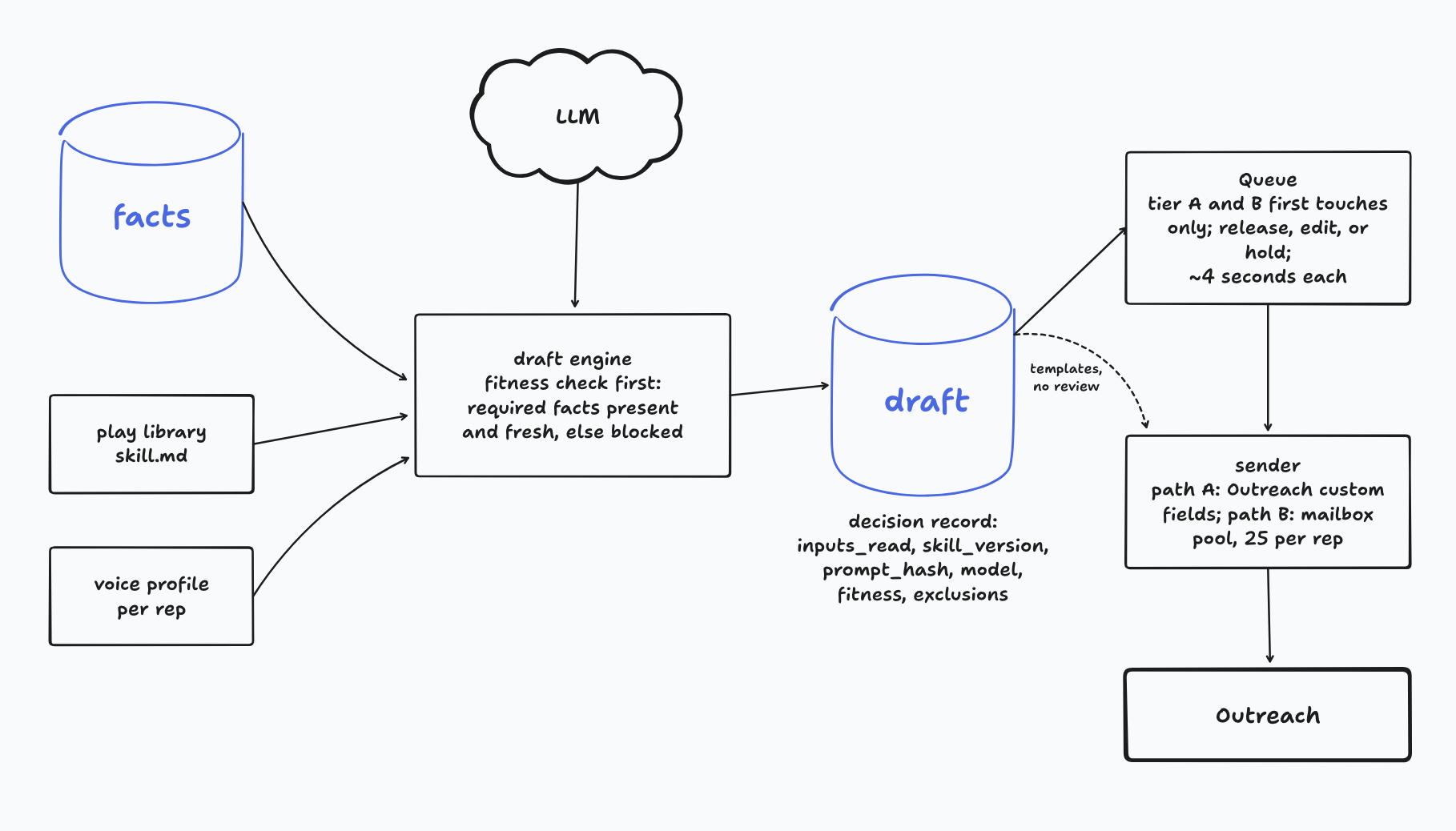
The cutter is a small program, and this is what ours does. It orders accounts by account score and snake-drafts them across the active reps, one account per pick, so no account is ever split between two people. It caps contacts per account at four, best rank first, and fills each rep to 2,000. Then it sorts the 2,000 by rank and slices them into ten days of 200, so the best-ranked go out first. The tiers fall out of the same sort: the top 200 get tier A, the next 300 with a phone number get tier B, and everyone else is tier C. Every tenth contact by rank is flagged as a holdout and gets the plain template, so we can measure the lift from tailored drafts against something.
If enrichment can’t find an email for a contact, they drop into a call-only pool when they have a phone number and their score clears the tier A floor, and into a re-enrichment queue otherwise. Tier is a recommendation; a rep can move someone up, and the override is logged with a reason.
Step 5: the page, and the write-back
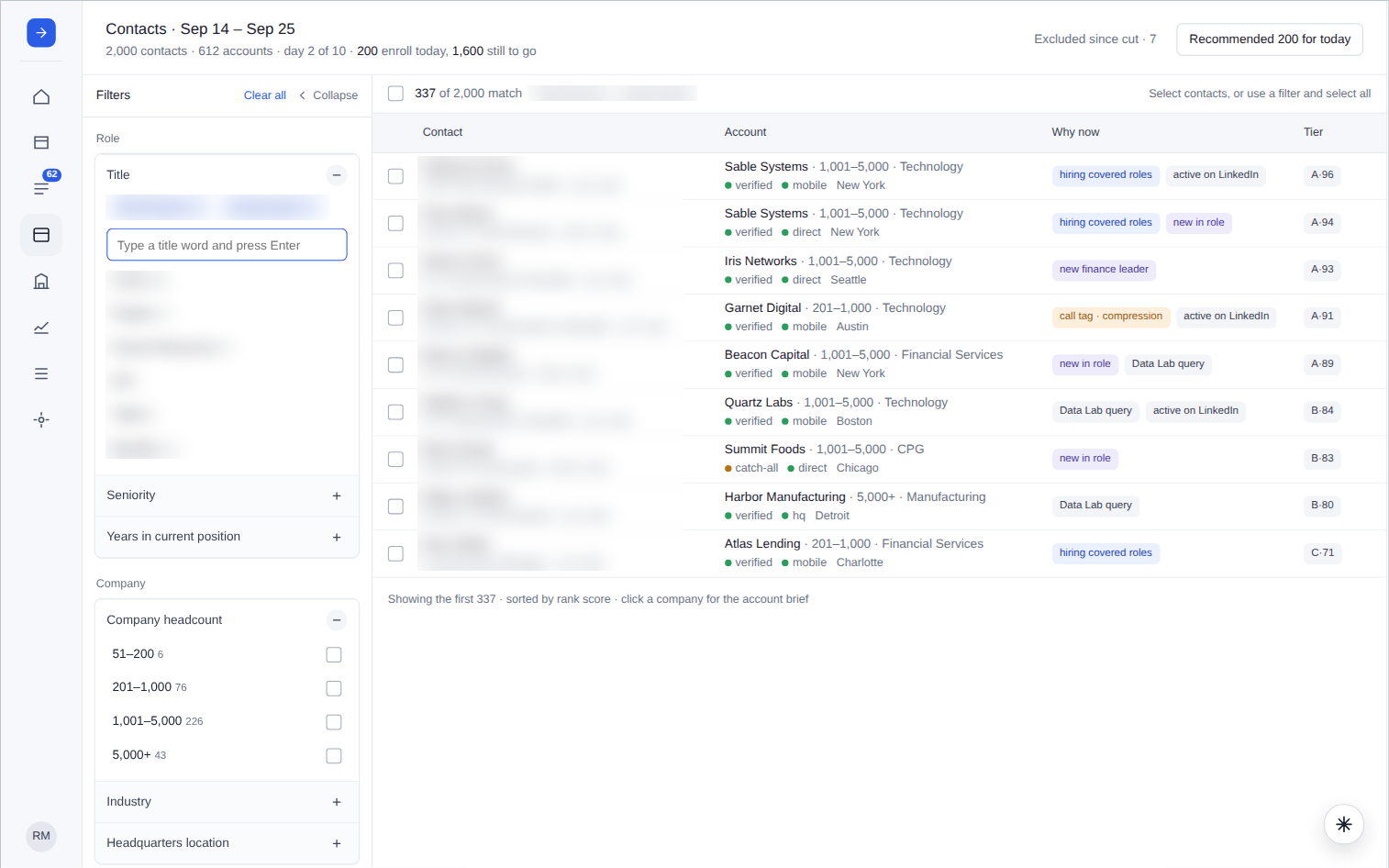
The Patch page is a query over patch_member joined to contact, account, facts and call tags. Nothing on the page is computed there. It shows what the cutter decided, and it records what the rep does with it: a tier decision, a skip, an override. That’s the whole contract between the app and the data. When a rep filters to ICP titles at 1,001 to 5,000 headcount and gets 337 people, the page is only reading a column.
Then the write-back pushes the patch id, the tier and the rank back onto the Salesforce contact, so anyone looking at the record in Salesforce sees what the system decided, and so the drafts can land in Outreach custom fields for the sequence to send them.
The system
The point of all of this is speed. A rep in this system touches 200 new people a day and sends 1,000 emails, and the part they do by hand takes minutes. (The screenshot of the Queue below shows it: 62 first touches ready, 12 released so far this morning, 4.1 seconds per release.) Tier A and B first touches are the only drafts a rep reads, about 50 a day, and at four seconds each that’s under five minutes. Everything else, the follow-up steps and all of tier C, is a template with slots and goes out on its own.
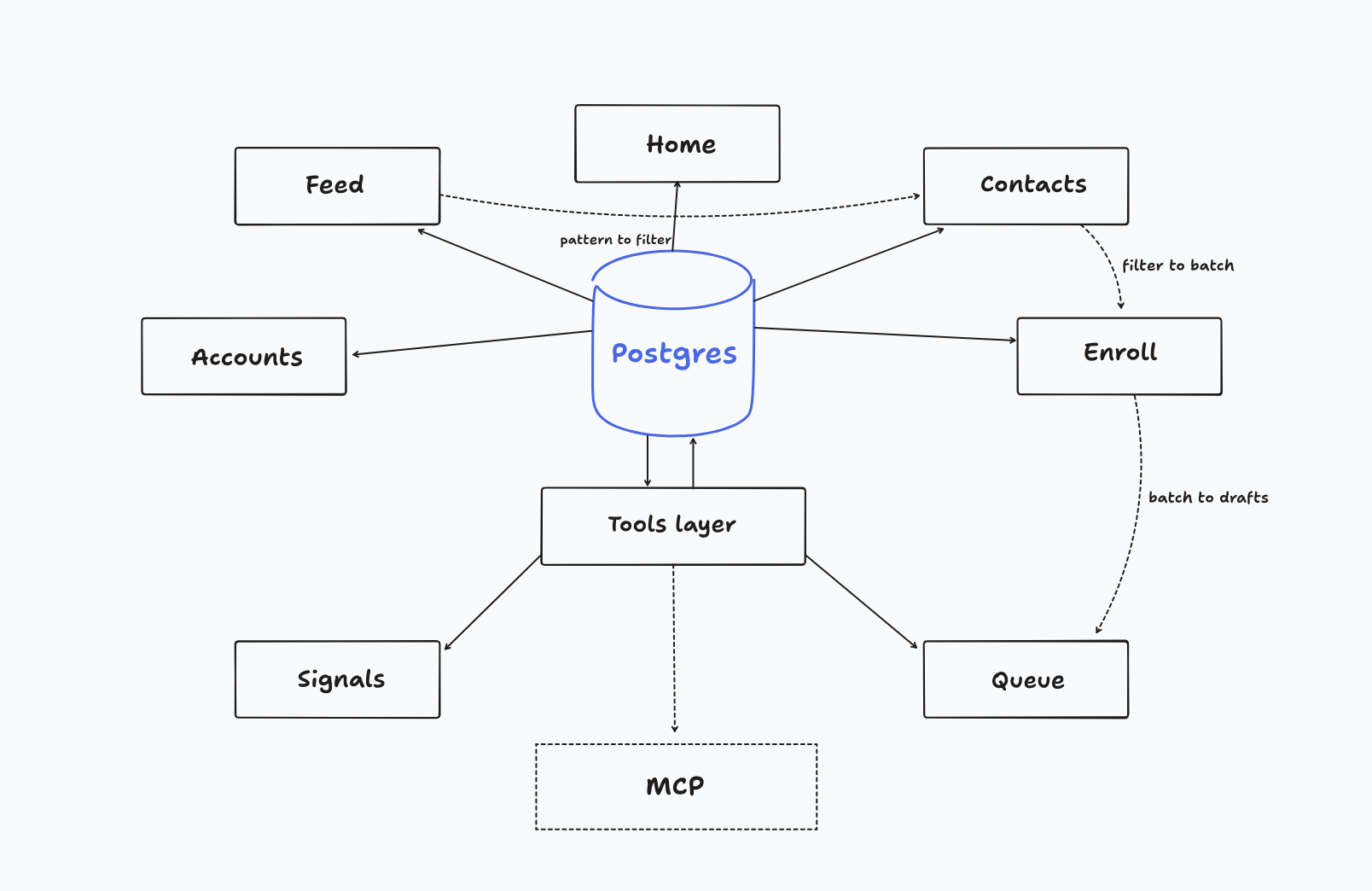
The app is seven tabs, and they’re one database seen from seven angles. Home is the day: how many to enroll, how many drafts are waiting, what happened overnight. Feed is what the data noticed while you slept, team-wide: a meeting booked from a play, a pain that five calls in the same industry raised this month, two people in your patch who used the product at a previous company, each with the quote or the number that backs it and a button to act on it. Contacts is the patch, 2,000 people with the reason each one is there, filterable by title, seniority, headcount and industry. Accounts is the same data grouped by company, with the brief. Signals is the raw material behind the Feed, every tag and trigger, searchable. Enroll is where a rep or a play puts people into a sequence, and where the exclusions get checked one more time. And the Queue is where drafts wait for a human.
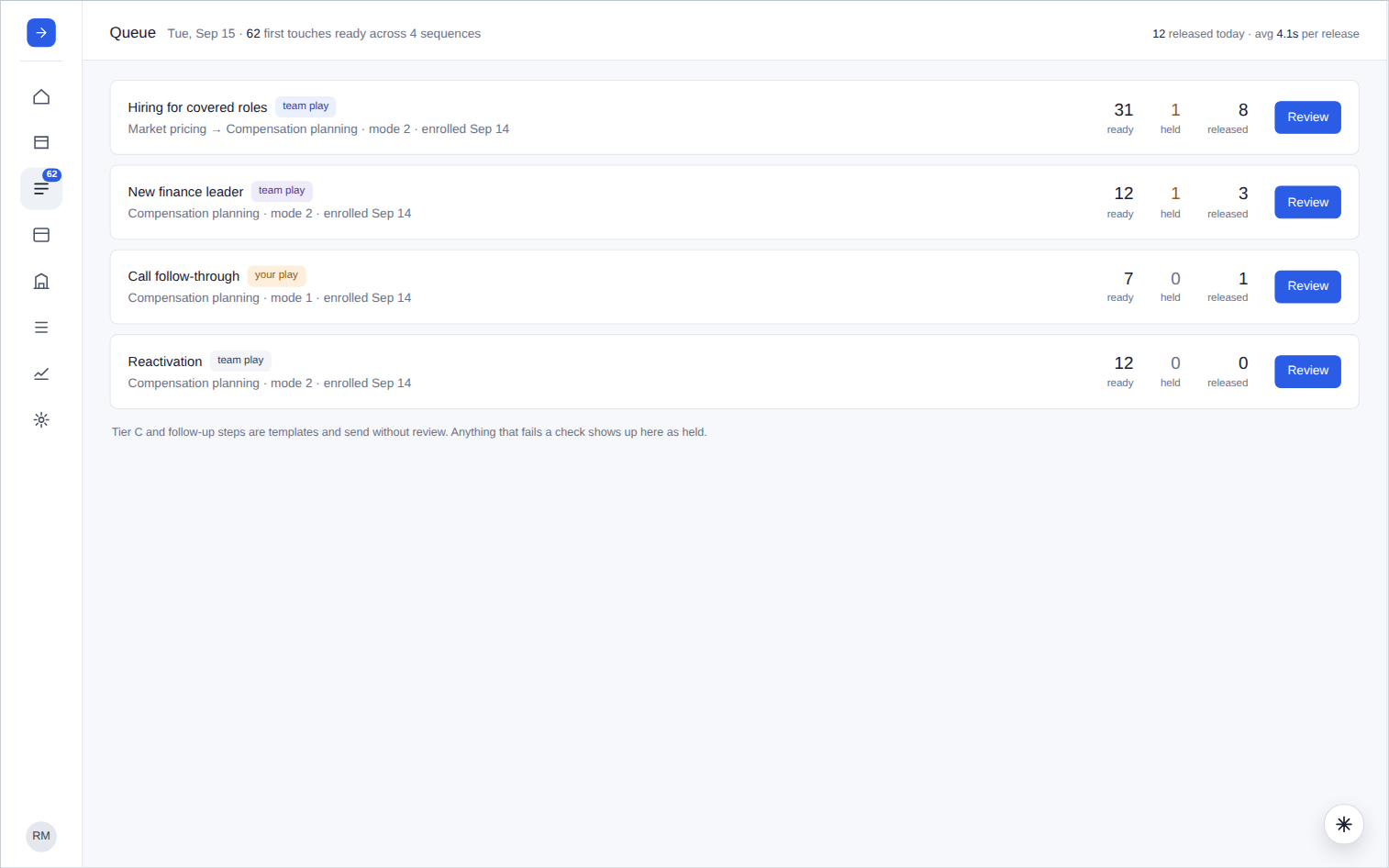
A draft in the Queue is two levels deep: the sequence, then one draft with the email, the facts it cited as verbatim quotes with their source, and three buttons. Release, edit, or hold. They’re judging whether they’d sign it, and the facts panel is there so they can check the one claim in it in a glance.
Because every tab is a query over the same tables, they compose. A pattern in the Feed becomes a filter in Contacts becomes a batch in Enroll becomes drafts in the Queue, and nothing is recomputed along the way. The same is true of the agent. The MCP server exposes the tools the tabs run, so when a rep asks Claude for the people in their patch with Data Lab usage and no phone, it runs the same tool, applies the same exclusions, and gets the same 41 people.6
How the 2,000 are scored
The scoring rule is a lookup into who takes meetings, by persona and company size. Here’s where each input came from, and how we built it. Each one was its own small data project.
Title. Sometimes titles were a mess. The same job is spelled a dozen ways, three titles that look alike can be three personas and three seniorities, and the distinct strings run into the thousands. A YAML file of regex patterns maps them to our five ICP personas, and five seniorities from C-level down to individual contributor. First match wins, and the file is versioned. Titles that match nothing go to a model, which is asked the same question with the same vocabulary, and the answer is cached by title string so each distinct title is classified exactly once. Seniority always comes from the rules, because a model guessing seniority is where the plausible nonsense starts.
Org design. The shape of a company’s org tells you more than its headcount. We get this data from HarvestAPI: give it a company and it returns the people there with their titles. We ran the titles through the same persona rules and counted per function, and got a row per function:
org_shape(account_id, function, headcount, as_of)It becomes a signal once we run our own customer base through it first. We took every customer, pulled their people, counted the ICP function at each, and took the median by size band:
customer_benchmark(size_band, function, median_headcount)Now we know what a company that buys from us looks like at 200 people and at 2,000. Then we run prospects through the same call and compare. A 1,000-person company with one person in the ICP function, when our customers at that size have three, looks like a company about to feel the pain we sell to.
Engagement history. Everything Outreach and Salesforce already know: clicked, replied, and whether anyone at the company shows up as a product user in BigQuery. This is a multiplier on the score, not a gate.
Past customer. Salesforce can’t tell you this, because the contact record knows where the person works now and the contract record knows which accounts were customers when, and nothing joins them. So we built the join.
First, a timeline of every customer. From Salesforce, every account that has ever been a customer, the closed-won date, and the contract start, renewal or churn date. From BigQuery, the first and last product activity per account. Together they make:
customer_timeline(account_id, start, end, status)Second, where a contact’s own history comes from. Two sources. They used the product: BigQuery has the emails and first and last activity of everyone who logged in at each customer account. Or they were on the deal: Salesforce contacts and opportunity contact roles at former customer accounts, Gong call attendees, meeting attendees. That second group evaluated or championed the purchase even if they never logged in, and they’re the ones who remember you.
Third, the join. We normalized each past employer in the vendor’s employment history to a Salesforce account, domain match first, name match with a confidence second, unresolved dropped. Then for each contact and each past position we checked whether the employment interval overlaps a customer period at that account, with a tolerance of a month or two on either end, since both sets of dates are approximate. We wrote:
past_customer_link(contact_id, former_account_id, overlap_start, overlap_end, evidence_level, confidence)Job postings. A scheduled pull of open roles per account into a table:
job_posting(account_id, title, function, level, location, posted_at, url, text)Each posting becomes an account fact with source = job_post, an as_of that’s the posting date rather than the sync date, and a short verbatim excerpt the draft can cite, so a play can say “you’re hiring for a role we cover” and point at where it saw that. The second use is relevance. Pave’s benchmark dataset covers around 9,000 companies in real time, and customers use it to see current market data for the roles they’re hiring. So a company hiring for a role the dataset covers is a company that could use the product tomorrow, and a company hiring for roles it doesn’t cover isn’t, however many openings they have. A dataset_coverage.yaml lists the job families, levels and geographies the benchmarks cover, and a classifier scores each posting against it, rules for the obvious families and a model with a closed vocabulary for the rest, the same pattern as titles. Aggregate per account into a count and a share of covered open roles, and you have a signal that a company is hiring into exactly the roles you have data for.
All of these land in the same two tables, account facts and contact facts, and every row has a source and an as_of date. Each play declares which facts it needs and how old they may be: the new-finance-leader play wants a new-exec-hire fact under 90 days old, the hiring play wants open roles under 45. Before a draft is written, the engine checks that each required fact is present and fresh, and if not, the draft is recorded as blocked with the reason.
What the transcripts know
I’m a firm believer that the best facts you have are in your calls. Gong records everything and the recordings sit there. Any one of them might contain a sentence like “we just moved to posting ranges in Colorado and we’re not confident the ranges are right,” which is a better first line than anything a model writes from a headcount. Getting those sentences into the facts table, tagged against a closed vocabulary, checked mechanically, and written as account facts with source = gong and a verbatim quote as evidence, is its own system with its own quality loop, and it deserves its own essay. I’ll write that one separately. For this one: the draft engine never reads a transcript. It reads a fact that came out of one, with the quote attached.
Once there are enough reply threads and transcripts to be worth searching, the same material gets chunked and embedded into pgvector in the same Postgres, alongside the play library and the product docs. That’s stage two, and I wouldn’t start there. On day one there’s nothing to embed.
How you know something is off
The failure that happens is Salesforce changing and the system not noticing. For example, a field gets changed in admin, an admin bulk-updates account types, all the way to a token expiring and the sync returning nothing.
So a sync_health table is populated every run: row counts compared against a live COUNT() in Salesforce, so a run is only ok if the numbers match. Watermark lag, so if the last successful sync was four hours ago and the schedule is hourly, something alerts. The null rate on key fields, because a spike in null emails means a field got renamed, not that everyone lost their email. Schema drift, fields appearing or disappearing, as a row rather than as a crash three jobs later. And dbt tests on the models: unique ids, not null, accepted values for picklists, referential integrity from contact to account. A nightly reconciliation does the same for enrollments, comparing what the app believes with what Outreach says, in both directions, and writing the difference to the same table rather than fixing it silently.
Why this works
Every decision the system makes, who to write to, what to say, who to skip, whether to trust itself, is a query over one database that already holds everything the company knows about the person. The scoring is a query, and so is the patch, and so are the pages. The facts a draft may cite are a query with a date filter on it. When you have that, 1,000 a day stops being a stretch goal and becomes the thing that falls out.
The numbers I care about are the two numbers on the Queue page: how many drafts a rep accepts as written, and how many seconds each release takes. If those hold, the 1,000 takes care of itself.
Footnotes
-
A patch here is a list of contacts, essentially your book of business. ↩
-
Google’s bulk-sender guidelines define a bulk sender as one sending close to 5,000 messages a day to Gmail accounts, require SPF, DKIM and DMARC and one-click unsubscribe on marketing mail, and want the spam rate kept under 0.1% and never allowed to reach 0.3%. Google Workspace’s per-user limit is 2,000 messages a day. Outreach has an absolute limit of 5,000 emails per week per mailbox. The sender guardrails in the repo are set at 40 per mailbox, 120 per domain, 14 days of warmup, and pulling a mailbox when its bounce rate passes 2% or its complaint rate passes 0.3%. Sending through Outreach custom fields, written the night before each step, comes first; the mailbox pool is for when volume demands it. ↩
-
Emails on business days 1, 3, 5 on one thread and 8, 10 on a second thread with a new subject. Calls on days 2, 4, 6, 7 and 9. LinkedIn connect on day 2, a message on accept, a follow-up around day 9. The sequences are built once, centrally, in Outreach; reps do not build their own. ↩
-
The Bridge Group’s 2025 SDR Metrics report, 351 B2B companies, puts the median at 112 activities a day: 44 calls, 41 emails, 19 LinkedIn touches. I am reading the per-channel split from their web summary and have not checked it against the PDF. ↩
-
Sixteen rules in the current file, including two that are logged but not yet enforced: an email domain that does not match the account’s domain, and a vendor employment record showing the person has moved on while Salesforce still says they are there. In the model world about 3% of contacts are flagged still-at-company and have left, and the shadow rule finds them. The file also sets one rep per account at a time and 90 days of rest before the same rep gets the account back. ↩
-
Vishnu Suresh and Jess Ou described LangChain’s GTM agent the same way in March 2026: the first thing it does is look for reasons not to send anything, the rep approves the draft in Slack, and a diff between the draft and what the rep sent is stored per rep. ↩