Putting a modular synth in a tldraw canvas
I had heard about Strudel for a while and never used it. It is a small language for making music by typing patterns, and I wanted to point it at something odd. A modular synth I could draw by hand, the way you would sketch one on a napkin, and then actually play.
Here is where it ended up. The rack in the video is hand drawn, and every knob, jack, and cable in it works.
Demo
Two programs and a wire
Strudel is a live coding environment that runs in the browser. You type patterns, it plays them, and you edit while it runs. Under the hood it is a faithful JavaScript port of TidalCycles, the older Haskell language for the same job.1
tldraw is the infinite whiteboard you have probably seen a demo of. The product is an SDK: a canvas engine you embed in your own page and extend.
The plan was ordinary. Strudel writes a stream of tiny messages, “play a C2, right now.” A cable carries them to a rack of synth modules, and the rack turns each message into sound. The usual rack for this is VCV Rack, a software modular synth: a wall of virtual knobs and patch cables where each module does one dumb job and you wire them into a sound.
So the sequence had three steps. Strudel writes the piano roll. A cable carries the “press key now” messages. A rack turns them into sound, except my rack is a drawing.
Everything on the canvas is data
Why is any of this possible on a whiteboard? Because tldraw is an SDK, and it gives you three things that together make a synth.
The first is that custom shapes are real web apps. The plug-in system lets you say: here is a new shape called knob, here is the little data card it carries, and here is the living HTML to draw for it. Not a picture of a knob. A working text input you type patterns into, a canvas element running a 60 fps spectrum animation, a row of piano keys. So a module panel is two things at once: a shape you can drag, delete, and undo, and a tiny app you can twist and type into.
The second is that everything on the canvas is data. Every shape, including every freehand scribble, is just a row in a little database: type, position, size, points. That is why the code can read a drawing. When it looks at your hand-drawn module and finds the circles, it is querying that database. Nothing on the canvas is only ink.
The third is that the database announces every change. The store is observable, so when you drag a knob it fires an event in the same JavaScript instant. A listener catches it and updates the audio. No polling, no save button, no gap between the picture and the sound.
Put those together and a knob turn is a very short, very literal chain: change a number in the database, a function call, a change to a number in the audio hardware’s settings.
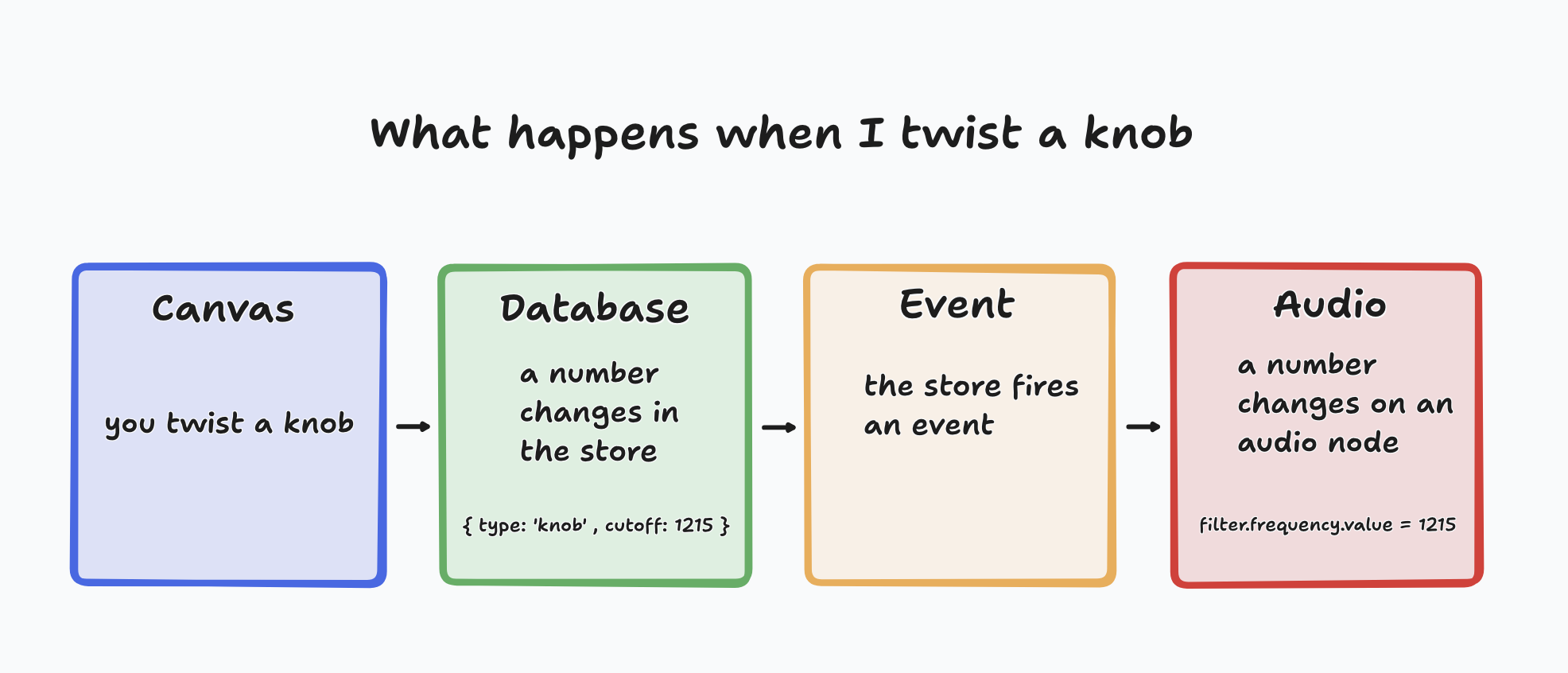
A drawn knob and the filter it controls are not two things kept in sync. They are the same number, seen twice.
Drawing a module, then blessing it
The dream was backwards from how software usually gets built. I did not want to build a UI that looked hand drawn. I wanted to hand-draw the UI, then make the drawing operational.
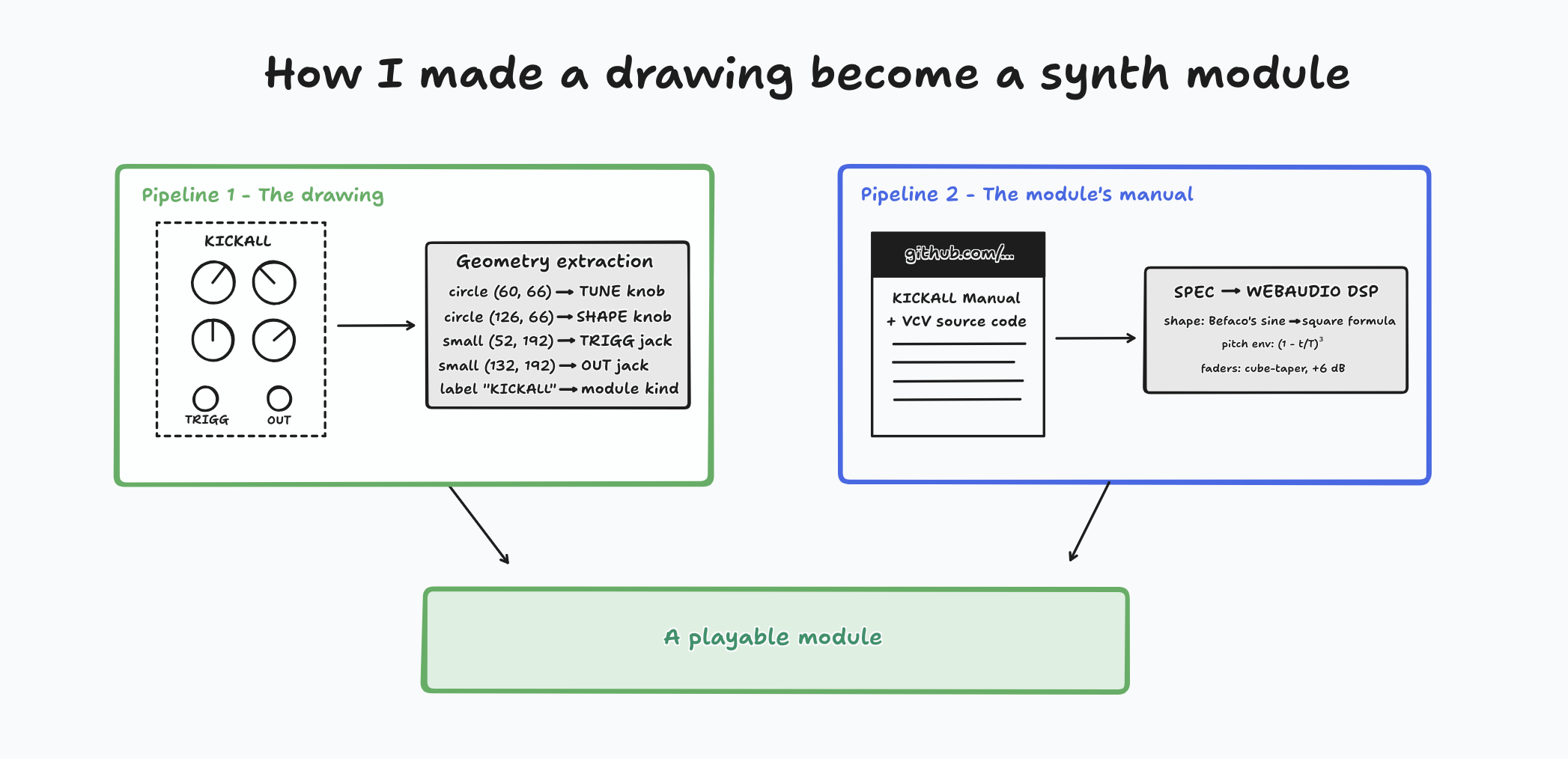
So I drew a module. Circles for knobs, small circles for jacks, labels for buttons. Then I selected the drawing and blessed it. The code scanned the selection, found the circle-ish shapes, and parked an invisible working knob on top of each one, just an arc and a needle that appeared when I touched it. Labeled scribbles became buttons. The drawing stayed the face, and the machinery hid underneath, like a paper control panel taped over a real one, except the tape is what makes it real.
For the full rack I drew each faceplate. Each one got a geometry file, the extracted coordinates of every knob, jack, button, and display window in the drawing, and ghost controls were laid onto those coordinates. Then I drew arrows between the jacks. Those arrows are the patch cables, and they actually patch.
The modules are cloned from real manuals
I recreated real Eurorack ones, the same modules you would rack up in VCV: Mutable Instruments’ Plaits for the macro oscillator, Befaco’s Kickall for the kick drum, a clock, an 8-band EQ, MindMeld’s MixMaster console, and an audio interface for the final output.
The pipeline for each one was the same. Fetch the module’s official manual, or its open-source code from GitHub. Write a spec document: every knob, every jack, what each one does, and the weird behaviors. Then implement the sound from the spec, checking the math against the source. The manual became the test.
Some of it got absurdly faithful. The Kickall’s shape knob uses Befaco’s exact sine-to-square waveshaper formula from their code. Its pitch envelope is the same (1 − t/T)³ polynomial. MixMaster’s faders use the real cube-taper curve, +6 dB at the top, with equal-power panning.2
So the drawn rack is not a picture of a synthesizer. It is a port of one, wearing a hand-drawn skin.
The pretend cable I didn’t need
MIDI is how two music machines talk. It is the standard invented in the 80s so any keyboard could drive any synth. A MIDI message is tiny, just a few numbers, and it carries the instruction to make a sound and nothing else.
Normally MIDI runs down a physical wire between two boxes. But here both “boxes” are programs on one computer, so there is no wire to plug in. The trick people use is a loopback driver: a pretend cable the operating system creates.
I built the whole thing around that pretend cable. One program pushes messages in one end, another hears them come out the other. Then I found I did not need it.
Here is why. A real cable, or a loopback standing in for one, delivers each message at the instant it happens. The sender waits for the exact moment a note is due, then fires it, and the receiver plays it the moment it arrives. But the operating system is juggling hundreds of other jobs, so the message lands a few milliseconds late, and a different few every time. That scatter is called jitter, and it is easy to hear in a drum groove.
My canvas modules and Strudel are the same JavaScript, running in the same browser tab, sharing one clock. So Strudel does not have to wait for the moment and shout “now.” It hands each note over directly, about a second before it is due, with the exact time stamped on it. The message stops being “C2, now” and becomes “C2, to be played at exactly 3.51000 seconds.”
That timestamp is the whole difference, because the browser gives you an appointment book for sound.
setValueAtTime(what, when)
A call like that books a change for a specific moment, and once it is booked the audio hardware runs it by itself, on its own clock.
The clock is what makes it exact. The browser’s audio system counts samples, 48,000 of them a second, and everything schedules against that one stopwatch. “Play at 3.51000” means sample number 168,480, and it happens there and nowhere else. Sample accurate, zero jitter.
This is also why a real cable cannot do it. MIDI was built to connect machines that would never share a clock, so the only instruction it can carry is “do it now,” with all the jitter that “now” implies. The pretend cable was solving a problem I did not have, so I deleted it.
What a MIDI message actually is, and where 3.51 comes from
A MIDI note is three bytes, three numbers between 0 and 255. A note-on looks like [144, 36, 100]: note on, pitch 36 (a low C), pressed this hard. That is the entire message. There is no time in it anywhere, which is the point above.
The time comes from arithmetic on the pattern, not from a knob. Press play once, and Strudel starts a scheduler, a little metronome that wakes about ten times a second. Each time it wakes it reads the pattern and does math. Say a part holds c3 at 11 pulses over 16 steps, tempo 138. One bar is about 1.74 seconds, so one sixteenth step is about 0.109 seconds. The euclidean rhythm says a gate lands on a certain step, and if the bar started at 3.400, that gate is due at 3.400 + 0.109, which rounds to about 3.51. Every note’s time is computed, not triggered.
Then Strudel hands the result over early, and my code books it:
osc.frequency.setValueAtTime(130.8, 3.51): at 3.51, snap the oscillator to 130.8 Hz, a C3.gain.linearRampToValueAtTime(0.9, 3.519): have the volume ramped up by 3.519.
Those are the “tell it” moments. After that the hardware runs the appointments on its own, and my code can go back to sleep.
One conductor, two orchestras
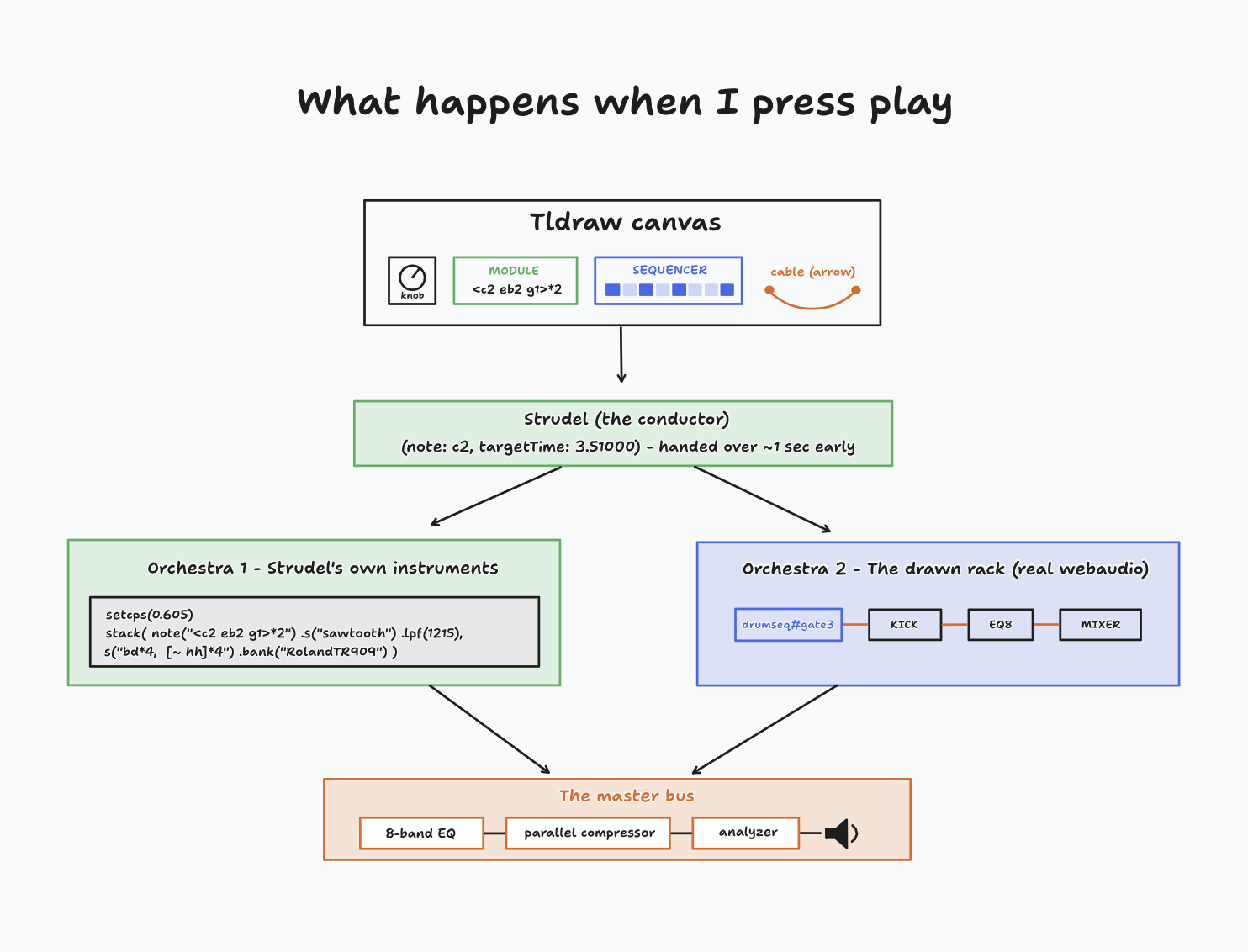
Strudel is always the conductor. It reads the patterns, does the math, and produces the stream of timed instructions, “C2 at exactly 3.51000.” What changes is who receives them.
The first orchestra is Strudel’s own instruments. Some canvas modules compile straight into a Strudel program: the engine walks the canvas, reads every module and knob, and writes the code for Strudel to play itself. These make sound the normal Strudel way.
The second orchestra is the rack. Other modules are deliberately silent in Strudel. The euclidean sequencer, the clock, the drum sequencer’s rows: Strudel plays them, but their sound is nothing but the timed instructions. Gates, not notes. Those instructions flow down whatever cables I drew. Each cable is a standing delivery route to one jack, and at the far end sits a synthesizer voice built from the browser’s raw audio parts: an oscillator into a filter into a volume envelope, wired node to node exactly like the signal path in the drawing. The audio cables between modules are those literal connections: kick out, into the EQ, into a mixer channel, into the audio interface, into the speakers.
Both orchestras book their appointments on the same audio stopwatch, which is why they stay sample-locked to each other. That is the pretend-cable discovery again, paid off: one clock, so nobody has to shout “now.”
And there is one mixing desk at the end. Everything, including Strudel’s own output, which I quietly re-route, passes through a master bus: an 8-band EQ, then a compressor blended in parallel, then a spectrum analyzer, then the speakers. The EQ, compressor, and analyzer you see on the canvas are not decorations. They are the control surfaces for that bus. Draw a rack, and the rack has a master chain.
So little separates the picture from the sound. A drawn knob is a row in a database, and so is the filter it drives; turning the knob writes one number that both of them read. The rack is not a drawing of a synth sitting next to a synth. It is one object that happens to have a hand-drawn face. That is a strange way to build an instrument, and I am not sure it is the right way. But it was a very fun one.

Footnotes
-
Strudel is open source and runs at strudel.cc. It is a browser port of TidalCycles, which Alex McLean started, and the JavaScript version is largely Felix Roos’s work. ↩
-
Where a manual could not be fetched, the spec says so in a note at the top, so I know which details still need a second check. ↩